How to Present a New Art Lesson-Be Successful The First Time

Posted by admin on May 1st, 2011

Blog PostIt can be scary as an Art teacher when you are considering a new project for your class.  With some mediums and classes, it can be a gamble.  New teachers struggle with this dilemma on a regular basis, and a lot of times, it’s part of the learning process.   Experienced teachers have their “tried and true” projects that get repeated every year.  But where’s the fun in doing the same stuff year after year.  What a boring life this would be!  Even experienced teachers need to try a new lesson every once in a while.  The purpose of this article is to take a look at some of the precautions and considerations that you can take to make sure that that new art lesson will be a success and not a total failure.

All veteran art teachers, at some point in their career,  have presented a project or lesson that completely failed.  It’s a part of the job.  It’s part of the learning process.  And it’s part of becoming a great teacher.  Recognizing mistakes and understanding how to prevent them is a skill that every great art teacher should long to develop.  No teacher nor lesson is perfect.  So how do we prevent total failure when we present a new project, maybe a risky project, to a group of students?  How can we ensure that the project will be successful?  Well, I don’t have all of the answers, but I can share what I’ve learned along the way.

Begin with A Purpose
The first thing that you need be sure of when designing a new art project or lesson is that there is a purpose.  No student will “buy in” to what your preaching if they don’t see the relevance of what they will be creating.  Make sure that the project that you are presenting to your students is concrete enough for them to understand the purpose.  Usually this can be stated in one or two sentences.  If it can’t, you may need to focus your purpose a bit more.  An example of a purpose statement may be…”The purpose of this lesson (project) is for students to learn of the relationship of positive and negative space to artistic composition; and to create a paper cutout image that balances the use of positive and negative space”.    Once you have a clear purpose, every other aspect of the lesson planning should reflect that purpose.

Create a Plan
Most teachers will moan and groan at creating lesson plans.  But creating a definitive and clear lesson plan will help ensure that your new lesson becomes a success.  You can use whatever structure that you like but there should be: (a) a clear objective (Purpose statement), (b) outlined procedure- including how you will present the lesson and what is expected of the students, (c) evaluation guide-how the students’ work will be graded and (d) a list of required materials.  Perhaps, create a lesson plan template that makes you comfortable, yet is effective. If you’re nervous about the lesson, write down everything that you want to say.  During my first year teaching, I did that and it helped me ensure that I didn’t leave out anything that I wanted my students to learn.  Don’t be afraid to look at your lesson plan while you are presenting the lesson to your students.  After a couple presentations, you won’t need it anymore.

Create an Example
Never, ever approach a new art lesson with a group of students without attempting it yourself.  You’d be surprised how many teachers jump right into a new project without completing an example.  Create an example of a completed project for the students.  During the creation process, ask yourself some questions…

  • “Will my students struggle with this exercise?”
  • “What are some possible mistakes that students could make?”
  • “Is this exercise too hard, or too easy?”
  • “Does this exercise reinforce the purpose?”
  • “Is there the potential for a quality product?”
  • “Will this assignment help my students grow artistically?”
  • “Will this assignment encourage creative thinking and problem-solving?”
  • “What are the keys to success in this lesson?”

As you create your example project, these questions should be answered.  You may even want to jot down the answers.  Use these answers to create your lesson presentation to your students.  Warn them of any pitfalls that they may encounter and be specific on how they can be successful.

Prepare a Visually Stimulating Presentation
Now, it’s time to figure out how you will capture your classes attention and make them excited about the art lesson and the product that will result.  Our students respond to visual stimulation, so your presentation has to be visually stimulating.  There are a variety of platforms for doing this.  One obvious choice is a PowerPoint presentation.  PowerPoint allows you to roll through slides and present your lesson in a clear and concise way that can keep students attention visually.  Another option is to record on video your creation of the example piece.  (This is my fav method, of course.)  You can comment on the video while you show it to your class and point out your own creative process.  It’s okay if you make mistakes in the video.  In fact, it’s cool to show students that mistakes are part of it.  I have never done this before, but I know a few art teachers that like to dress up to grab their students attention.  You may decide to dress up as a famous artist from history, and depending on how far you want to take it, actually act like them.  (Disclaimer-Behaving like some artists from history is not a good idea.)  This depends, of course on the dynamics of your class.

Don’t Set a Due Date
This one may sound pretty weird, but the first time that you present a art lesson, I suggest that you let the project take it’s course.  Don’t rush the students to finish, but don’t let them slack off either.  Setting a due date at the start of a new project can be destructive to the success of the assignment.

These are steps that I go through when I present a new art lesson.  Granted, even with all of the steps, lessons can still fail.  These steps are just a way to help new lessons succeed.  Everyone will have a lesson failure every now and then.  Don’t sweat it.  Either improve it or chunk it.

Share

Why Be an Art Major

Posted by admin on April 12th, 2011

Blog PostStudents ask me all the time, “Why should I be an Art major?”. They need some convincing and they are searching for it from me. I’ve also seen a lot of students that are incredible artists decide to go major in business. The reason is because they have bought into a lie. The issue is that students have been told not to major in art by people that truly care about them. Their parents, grandparents, aunts, and uncles all tell them the same thing. That if they major in art, then they will be poor. This is a huge misconception and it needs to change.

True, in years past, if you majored in art and became an artist, you may have struggled financially. Being an artist used to be defined as creating art in a studio and selling your art through a gallery that took a fraction of your net gain. You needed to find a gallery to represent you, sell your work, and sell enough of it for you to make a living. Many artists today still operate this way. It’s not an easy life. A few become famous and become rich. But few indeed. Today’s culture, however, is different and the opportunities that exist for artists are endless. The question should be “Why not major in Art?”.

With today’s technologies artists have endless venues to share and sell artwork. The days of galleries dominating the marketplace are gone. Some artists make their entire living selling their artwork through the Internet. And because of the new technologies that are emerging more and more people are becoming patrons of art. But this is not the focus of this post. Instead, the focus of this post is on the evolving nature of what defines an artist. Technologies have created a new landscape for artists and the future economy belongs to the artist, not to the banker. Look around your world. Look at the creative products and services that we depend on and engage with. Mobile technologies and app creation, video games, 3D television, interactive books, and the list goes on. These products are created by artists. The new wave of artists and their art has arrived and is our future. I believe that we are truly entering a new renaissance where technology is the driving force of new art creation. You see, the opportunities for artists of tomorrow are endless. And new opportunities are appearing everyday. Art is the economy of the future. Think of the opportunities that exist today for graphic designers, industrial designers, animators, interactive designers, web designers, film makers, and illustrators. The renaissance that we are experiencing now may not be defined by oil paintings and marble sculptures. But I grant you that future generations will look back and see how artists of our era defined the future. Why major in Art? Simply because that’s where the opportunities exist.

Share

My Love for Digital Painting

Posted by admin on March 10th, 2011

Blog PostI have added a new assignment to the Electronic Media class that I teach. I can’t believe that I had not added it earlier as it is one of my absolute favorite forms of art-making. I’m talking about digital painting. And it seems that I had forgotten just how much I love it. I was reminded of the joy of digital painting (Ode to Bob) by demonstrating to my classes. It seems that I had gotten distracted, as often is the case in life, by other endeavors. But as I drew in Photoshop I was reminded of how much I love it. We are truly lucky as artists to have the vast array of media that we have at our disposal. I wonder what Leonardo DaVinci would have done with a computer loaded with Adobe CS5 and Wacom tablet.

Painting in Adobe Photoshop is unique The cleanness of the surface and the fluidity of the mark is quite appealing. If you are a traditional painter and have not tried digital painting, I would strongly recommend it. You may be surprised at how much it reminds you of traditional painting. An artist to check out is William Lowe. Do a search on YouTube for his name and take a look at some of his work. He was once a traditional painter but now he works exclusively digital. He is quite the master digital painter.

I’m definitely looking forward to finding some free time to explore my love for creating digital painting again.

Share

So I Bought an IPad

Posted by admin on March 6th, 2011

Blog PostSo here I am typing this post on a iPad. I didn’t get one for Christmas, but I have one now. This is what has been preventing me from building the site to function on an iPad or to develop an app specifically for the iPad. I must admit, I’ve been quite resistant. I am quite the Apple fan. I now own almost every Apple product in existence. But I’ve had a huge distaste in my mouth with Apple’s resistance to Adobe Flash. Especially considering that I heavily use Flash. This, in the end did not prevent me from my purchase. So let the developing begin. The only question that I have to answer now is, should I make the site iPad friendly; or should I develop an app that will house all of the videos. In the meantime, I will enjoy my new toy.

Share

Thoughts on Drawing

Posted by admin on March 3rd, 2011

Blog PostSo many people are disillusioned with the process of drawing.  First of all,  many people feel like they are not capable of drawing well.  This is just not true. ANYONE can draw and do it well, IF they truly want to put in the hours of practice that will result in true skill.  I think that so many people “buy into” the great talent myth that they limit themselves.  There is NO talent.  Sure, some people are able to learn and develop quickly.  But no one is born with the skill of drawing.  It is a skill that must be learned and developed.

Secondly, drawing is not something that happens in the arms or the wrist.  It is a process that occurs in the mind.  It is about seeing objects and arriving at a form of understanding about the object that is being drawn.  It about understanding how we see things.  How light is reflected off of objects.  How we perceive space, texture, color, and so on.  Too many people think that drawing is something that happens elsewhere than the mind.  When it is acknowledged that drawing is a cerebral activity, than it can more easily be digested as an attainable skill.

Drawing is a skill.  And just like with any other skill , drawing can be learned and developed.  Any skill that is worthwhile takes time and attention.  In other words, drawing well requires practice.  It does not happen “overnight”.  There are tips that may help us to better understand how we “see” objects, but in the end, the skill of seeing and the ability to draw well, comes with practice.  Look at the great athletes.  They practice constantly.  The athletes that are at the pinnacle of their sport are usually the ones that practice the hardest.  Drawing is the same.  In order to progress and develop at drawing, we must practice our craft.  Keep a sketchbook and draw constantly.  You will notice your skills improving.

Drawing is not just relaying what you see in a literal manner.  For a long time, I was enamored by highly detailed and realistic drawings.  And to a certain extent, I still am.  However, the drawings that appeal to me most, go beyond acquired skill and literal interpretation.  Drawings that speak their own voice are stronger than those that speak what we already see.  Therefore, the development of style and communication is also important in understanding drawing.  This skill is perhaps the most difficult to develop and learn.  And while still attainable and available to anyone who wants learn this skill,   drawing with a unique voice is the most difficult aspect of drawing to develop.    With time and practice however, this skill can also be learned and developed.  Drawing is one of the oldest and deepest means of communication and expression.  What do your drawings say?

Share

Teach Art History with The Google Art Project

Posted by admin on February 11th, 2011

Blog PostWhen discussing art history with students, it is sometimes difficult to help students truly appreciate works of art throughout history.  A work of art shown in reproduction often loses many of the nuances that make it great.  It is hard to capture brushstrokes, subtle changes in color and value, and other aspects of the work that just can’t be appreciated in a reproduction.  If only there was a program that could nearly duplicate a live visit to a museum.  Well, thanks the Google, there is!  It’s called to Google Art Project.  The Google Art Project can be defined in one word- “Awesome!”  It allows us to virtually visit many of the museums and collections that house some of the most influential and beautiful artworks produced throughout history.  Not only that, but the website allows us to zoom in incredibly close to these works of art and see the aspects that make them great.  No brush stroke is invisible.  As you can imagine, this is a remarkable teaching tool.  Here is a link to the site-The Google Art Project.

Share

So What the Heck is This Thing?

Posted by admin on February 1st, 2011

Blog PostSo recently I’ve noticed these codes around.  Maybe you have too. They are like a type of barcode, yet they are square.  So these things are called QR Codes and they are huge in Asia.  They are beginning to catch on here as well.  They allow a person to scan the code with a mobile device using an app, and either a link to a website url or a message appears.  It seems like a really cool concept.  It’s actually a great way to advertise your art.  You can easily create your own QR Code at http://www.mobile-barcodes.com/qr-code-generator/ and print out copies to handout to people with a link to your website portfolio.  Or you create a phrase or put your contact info into a QR Code.  These little things will be catching on quickly so why not be ahead of the game now.  Anyways, I thought it was cool, so I made a QR Code that links to the mobile version of TheVirtualInstructor.com.  Here it is…

Share

Teach Color Theory with the Interactive Color Wheel

Posted by admin on January 25th, 2011

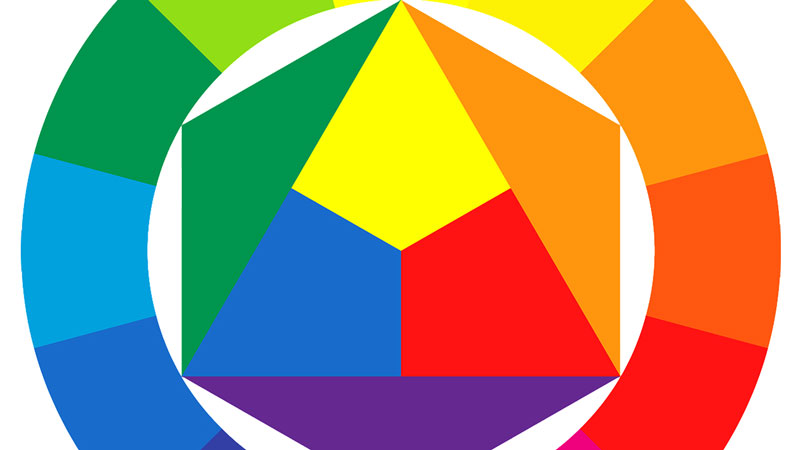
Blog PostColor theory is an important part of creating any artworks that include color.  It is important in painting, drawing, design and sculpture.  It is equally important that all students of art learn the basics of color theory.  I think most of us agree that choosing colors for a composition should never be guesswork.  Instead, a color combination should be well planned and executed.  This can only happen by having a good understanding of the basics of color theory.   I personally think that color theory is cool.  The way that the color wheel fits together like a puzzle is just cool.  Imparting that “coolness” to students and getting them excited about color theory can be difficult.  Color theory, when not presented in an exciting way, can be boring-not to mention confusing.  Over the years, I have experimented with different ways to teach color theory to students.  I also observed the way other teachers teach the concepts of color theory to their students.  Our students, or well maybe my students, are engaged in learning most when they can interact with the concepts that I’m trying to teach to them.  Sure, mixing colors with paint, and filling in a color wheel is interactive.  This is an activity that all students should participate in.  I’m not suggesting that this activity be scratched.  But I felt like my students needed a tool that would answer their questions about the basics of color theory in a more immediate way, something that they could could interact with.  A tool that they could have access to, and that would reinforce the traditional concepts that I taught them.  I searched for some color wheels on the internet and wasn’t satisfied with the results, so I decided to make my own.  So here it is, an interactive color wheel that students can access on a classroom computer.  It gives basic information about color theory as well as information about each color.  It breaks down the complementary color of each color, the immediate analogous colors, the split complements, a color triad, and a color tetrad.  It also explains the different types of colors on the color wheel and the role of the neutral colors.  I hope that you find useful for yourself as an artist or for your students.  Find the Interactive Color Wheel Here
Interactive Color Wheel

Share

Introduce Students to Texture

Posted by admin on January 20th, 2011

Blog PostTexture is one of the seven elements of art.  (Texture refers the way an object feels to the touch or looks as it may feel if it were touched.) Therefore, it is important that art students are taught the importance of texture in the creation of their artworks.  Unfortunately, a lot of teachers are at a loss as how to teach this important element to their students in an effective, engaging, and memorable way.  I’d like to share with you one way that I introduce students to texture.  It is a fun and engaging exercise that most students don’t soon forget.  But first, let’s review the basics of texture.

Texture refers mostly to tactility.  It is mostly measured in three dimensions.  However, it can be experienced as an illusion when it is drawn or painted.  The trick to teaching students texture lies in helping them make the connection between the physical texture and the illusion that can be created through value.  So, texture can technically be 3D or 2D.  3D texture is the physically experienced texture, while 2D texture (visual texture) is an illusion.  We can break down visual texture a bit further by determining if the texture is simulated or invented texture.  Simulated texture is the actual texture of the surface, while invented texture is purely synthetic or manufactured, perhaps like a pattern. (The bottom tread of your shoes is a good example of invented texture.)  When I explain texture to my students, I show them that visual texture is reliant on value for translation.  It is easy to do this by showing them a color painting that has great simulated texture, then show them a black and white version of the painting.  It is obvious that the illusion of texture remains, even though the color is removed.  Therefore, the key to the illusion of texture is value.

Now for the exercise.  I take 12 brown paper bags and put objects with interesting textures in them.  These objects may be seashells, wrinkled paper, and so on.  Pick objects that you think will have some interesting textures.  Number each bag with a marker.  Put each bag on a table throughout the classroom.  Students will then reach inside of the bag without looking, and then draw the texture of the object that they feel.  Even if they figure out what the object is, they should try to draw the texture, NOT the object.  Each student should should have the opportunity to draw the textures from each bag in the room.  At the end of the exercise, you can reveal what was in each of the bags.  This exercise will provide a memorable experience that bridges the connection between creating the illusion of texture and the physical texture of the object.  Plus, it’s pretty fun.

Share

5 Best iPhone Apps for Artists

Posted by admin on January 5th, 2011

Blog PostSo Christmas came and went and I didn’t get that shiny new Apple iPad.  Oh well, it doesn’t have Flash anyway.  Despite not having an iPad, I still have an iPhone and there are some great apps for artists.  We’ll take a look at the five apps that I think are best for artists.  I picked these five  based on their practicality and usefulness.  There are plenty of apps available that are well-just plain terrible.  But these are worth your money.

1. Brushes-$4.99 (Apple iTunes)-  Brushes is an app that allows you draw (paint) in a similar manner as Adobe Photoshop.  It features multiple layers and an easy to use interface.  If you make a mistake, it’s pretty easy to take a step backward to correct it.  You have several brushes to choose from and you can adjust the transparency of the mark relatively easily.  You can also zoom in and zoom out on your drawing by using two fingers.  Perhaps the coolest feature of Brushes is the fact that it records all of your brush strokes to a file that can be downloaded and then played back in Mac OS  X.  It can even be exported as a QuickTime movie.  So you can watch your painting come to life after you finish drawing it.

2. Layers-$4.99 (Apple iTunes) I found Layers to be the easiest app to use of the ones I played around with.  Layers is pretty much what the name implies.  It is a painting program that features five layers that can be moved around, edited and removed.  These features are also present in Brushes, but I found them easier to use and access in Layers.  Layers also features a smudge tool.  This tool was good in theory, but I found it difficult to use.  Again Layers has the ability to be replayed in the Mac OS X Viewer just like the Brushes app.  Layers also allows you to change the size of your brush as well as the transparency and color.  Perhaps Layers best feature is it’s ability to email finished images as JPG or as PSD files with layers.

3. SketchBook Mobile-$2.99 (Apple iTunes) Just like the other apps mentioned before, SketchBook Mobile features layers.  You get six layers in this app.  You can even duplicate layers.  SketchBook Mobile features loads of brushes and pencils.  It even features markers.  You can even customize your brush settings. Perhaps the best feature of SketchBook Mobile is the synthetic pressure sensitivity.  This feature makes your marks look natural and makes drawing in the app feel a bit more like you are using a tablet to draw with.

4. Colored Pencils- $3.99 (Apple iTunes) This app is built to simulate colored pencils.  I like this one because it includes the simulated pressure, so that your line tapers at the end just like a real colored pencil.  One drawback to this app is that you don’t have a lot of flexibility to the value of the mark, but you can easily change the transparency of the mark.  This app includes paper texture unlike the others.  So if you want to draw with lines only, then Colored Pencils is the obvious choice.

5. FlipBook- $4.99 (Apple iTunes) This app allows you to make short animations right on your iPhone.  It includes an onion skin feature which allows you to see what you’ve already drawn, so animating is very easy.  This app is a lot of fun and it’s easy to share what you’ve made once you’re finished.

Share

Copyright © 2012 TheVirtualInstructor Blog. TheVirtualInstructor.com Blog.